I'm living in the Province Liège (Belgium) which launches the
2012 Tour de France. It is with unfeigned delight and pride that, following up the success of 2004, the Province once again hosts the grand start of the Tour.
The Tour de France is an annual bicycle race held in France and nearby countries. As the best known and most prestigious of cycling's three "Grand Tours", the Tour de France attracts riders and teams from around the world. The race is broken into day-long segments, called stages. Individual times to finish each stage are aggregated to determine the overall winner at the end of the race. The course changes every year, but the race has always finished in Paris, along the Champs-Élysées (Wikipedia).
Running from
Saturday June 30th to
Sunday July 22th 2012, the 99th Tour de France will be made up of 1 prologue and 20 stages and will cover a total distance of 3,497 kilometres.
This important event taking place in my region is a new opportunity for me to use
iMindMap and
ThingLink tools in order to design an interactive map, and detailed mind maps for stages. Following
Patrick Zimbardo's idea who used a mind map for giving results about EURO2012 football matches (
see Patrick's mind map), I plan to update each mind map with the results of the day, during the time of the Tour.
 |
| Tour de France 2012 - Stage - Mind Map Overview with iMindMap |
You can
download the iMindMap file on Biggerplate plateform.
I truly believe that creative mind maps provide new ways of communicating useful information, whether it is for giving the big picture or going into the details. The stage mind map will inform you about the date, the distance, the profile (mountain passes, hills, intermediate sprint), the start and finish towns and once known, the 3 first cyclists crossing the finish line. I also invite you to read
Am I drawing true mind maps? where you will find another creative mind map describing the route and the profile of a specific stage.
Further to the recent success of the first
interactive mind map with ThingLink, I wanted to use once again this fantastic image tagging tool. I used iMindMap, the mind map tool from ThinkBuzan, to re-create the entire route of the Tour de France 2012. The software is extremely flexible and I've been able to draw the route with a true mind map (which you can eventually discover step by step with the presentation mode). I have already used the technique for drawing the
timeline or the
dot-to-dot game. On top of the image, I placed a ThingLink tag for each stage of the race. If you move your mouse over the route of a stage, you will expand the corresponding mind maps, which will give you the characteristics. Along the tour, the interactive image will also give you access to the main standings (individual, points and climber) and to the official website (
www.letour.fr)
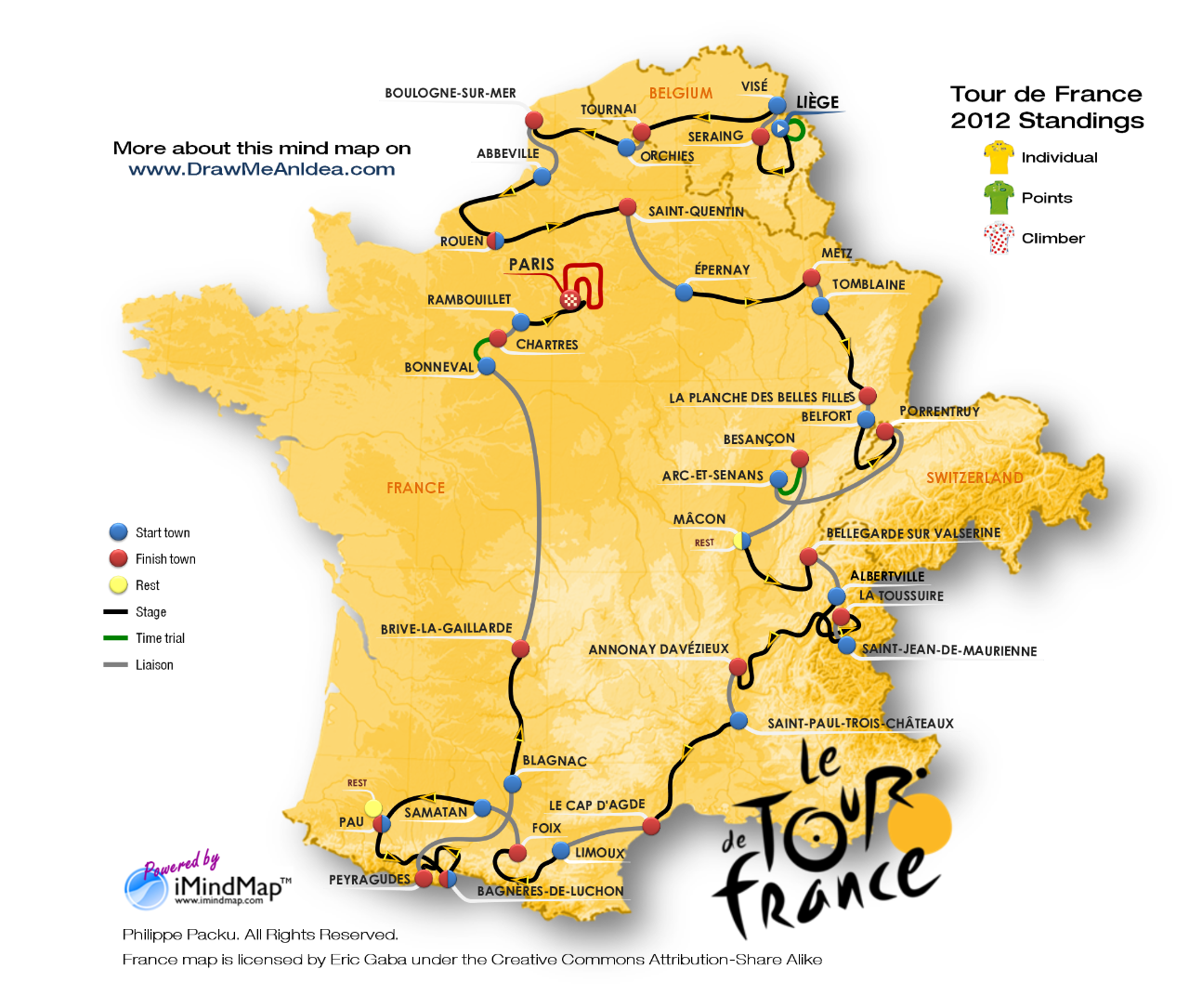 |
| Tour de France 2012 - Route - Interactive Mind Map with Thinglink |
Click
here if you want to access a larger version of the interactive map.
I hope you will enjoy this new creative mind map and its interactivity. Whether you like sport or not, the objective of this article is essentially to show the power of iMindMap combined with ThingLink in order to communicate information in an attractive and efficient way.
Do not hesitate to share your own experiences with the tools. You are also welcome to ask questions about the technique, start discussions about the topic, give some feedback or
contact me via the different channels for your requests or any additional information.
 Version française
 Using hashtags in your Tweets obviously increases the visibility of your message. They also allow you to start or join conversations. Discover in this article the list of most popular hashtags, their classification in an interactive mind map and a free tool to explore them If you are active on Twitter or if you plan to be soon, you may find helpful to have a look at the most popular hashtags you could insert in your messages. Twitter hashtags marks keywords or topics in Tweets. They are composed of a single word or phrase beginning with a "#" and with no spaces or punctuation. They were originally created by Twitter users and have become a so powerful and natural way to participate in global conversations that even Facebook rolled-out the system.


