|
Loading
It's all about the thinking process and a fantastic way of visualising it with Mind Maps. You will find here many resources that I'm collecting with my new passion. Whether it's rules, techniques, tutorials, tips, templates, stories, ... it may help you with mind mapping. I'm a ThinkBuzan Licensed Instructor and everything I will share with you here will remain connected somehow to Tony Buzan's world. Enjoy!
Showing posts with label Marketing. Show all posts
Thursday, July 25, 2013
Most popular hashtags on Twitter
Labels:
Communication,
Examples,
iMindMap,
Interactivity,
Marketing,
Mind map,
Search,
Social media,
Tagging,
Tutorial,
Twitter
Thursday, June 28, 2012
Tour de France 2012 - Interactive Mind Map
I'm living in the Province Liège (Belgium) which launches the 2012 Tour de France. It is with unfeigned delight and pride that, following up the success of 2004, the Province once again hosts the grand start of the Tour.
The Tour de France is an annual bicycle race held in France and nearby countries. As the best known and most prestigious of cycling's three "Grand Tours", the Tour de France attracts riders and teams from around the world. The race is broken into day-long segments, called stages. Individual times to finish each stage are aggregated to determine the overall winner at the end of the race. The course changes every year, but the race has always finished in Paris, along the Champs-Élysées (Wikipedia).
Running from Saturday June 30th to Sunday July 22th 2012, the 99th Tour de France will be made up of 1 prologue and 20 stages and will cover a total distance of 3,497 kilometres.
This important event taking place in my region is a new opportunity for me to use iMindMap and ThingLink tools in order to design an interactive map, and detailed mind maps for stages. Following Patrick Zimbardo's idea who used a mind map for giving results about EURO2012 football matches (see Patrick's mind map), I plan to update each mind map with the results of the day, during the time of the Tour.
You can download the iMindMap file on Biggerplate plateform.
I truly believe that creative mind maps provide new ways of communicating useful information, whether it is for giving the big picture or going into the details. The stage mind map will inform you about the date, the distance, the profile (mountain passes, hills, intermediate sprint), the start and finish towns and once known, the 3 first cyclists crossing the finish line. I also invite you to read Am I drawing true mind maps? where you will find another creative mind map describing the route and the profile of a specific stage.
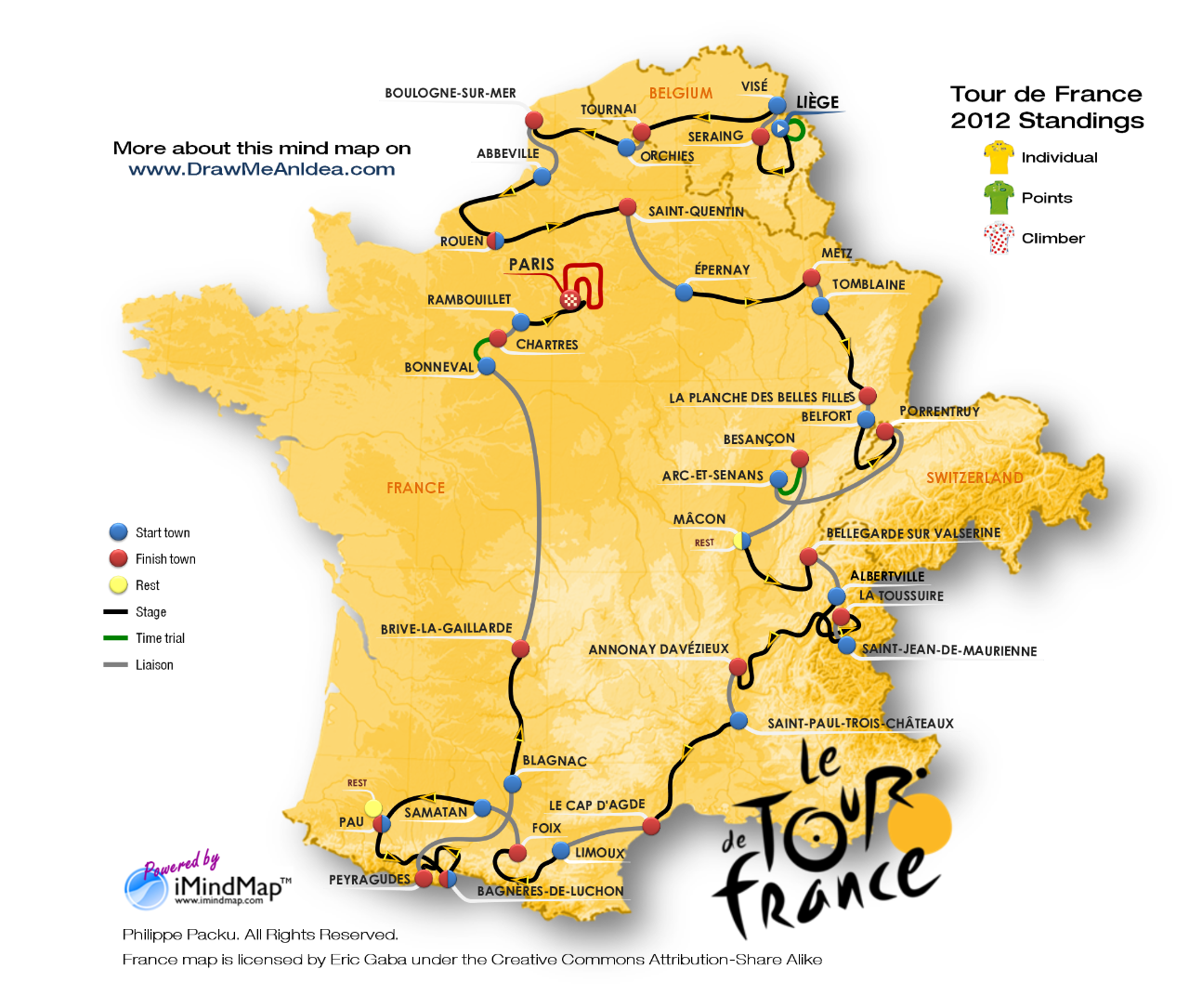
Further to the recent success of the first interactive mind map with ThingLink, I wanted to use once again this fantastic image tagging tool. I used iMindMap, the mind map tool from ThinkBuzan, to re-create the entire route of the Tour de France 2012. The software is extremely flexible and I've been able to draw the route with a true mind map (which you can eventually discover step by step with the presentation mode). I have already used the technique for drawing the timeline or the dot-to-dot game. On top of the image, I placed a ThingLink tag for each stage of the race. If you move your mouse over the route of a stage, you will expand the corresponding mind maps, which will give you the characteristics. Along the tour, the interactive image will also give you access to the main standings (individual, points and climber) and to the official website (www.letour.fr)
Click here if you want to access a larger version of the interactive map.
I hope you will enjoy this new creative mind map and its interactivity. Whether you like sport or not, the objective of this article is essentially to show the power of iMindMap combined with ThingLink in order to communicate information in an attractive and efficient way.
Do not hesitate to share your own experiences with the tools. You are also welcome to ask questions about the technique, start discussions about the topic, give some feedback or contact me via the different channels for your requests or any additional information.
The Tour de France is an annual bicycle race held in France and nearby countries. As the best known and most prestigious of cycling's three "Grand Tours", the Tour de France attracts riders and teams from around the world. The race is broken into day-long segments, called stages. Individual times to finish each stage are aggregated to determine the overall winner at the end of the race. The course changes every year, but the race has always finished in Paris, along the Champs-Élysées (Wikipedia).
Running from Saturday June 30th to Sunday July 22th 2012, the 99th Tour de France will be made up of 1 prologue and 20 stages and will cover a total distance of 3,497 kilometres.
This important event taking place in my region is a new opportunity for me to use iMindMap and ThingLink tools in order to design an interactive map, and detailed mind maps for stages. Following Patrick Zimbardo's idea who used a mind map for giving results about EURO2012 football matches (see Patrick's mind map), I plan to update each mind map with the results of the day, during the time of the Tour.
![]() |
| Tour de France 2012 - Stage - Mind Map Overview with iMindMap |
I truly believe that creative mind maps provide new ways of communicating useful information, whether it is for giving the big picture or going into the details. The stage mind map will inform you about the date, the distance, the profile (mountain passes, hills, intermediate sprint), the start and finish towns and once known, the 3 first cyclists crossing the finish line. I also invite you to read Am I drawing true mind maps? where you will find another creative mind map describing the route and the profile of a specific stage.
Further to the recent success of the first interactive mind map with ThingLink, I wanted to use once again this fantastic image tagging tool. I used iMindMap, the mind map tool from ThinkBuzan, to re-create the entire route of the Tour de France 2012. The software is extremely flexible and I've been able to draw the route with a true mind map (which you can eventually discover step by step with the presentation mode). I have already used the technique for drawing the timeline or the dot-to-dot game. On top of the image, I placed a ThingLink tag for each stage of the race. If you move your mouse over the route of a stage, you will expand the corresponding mind maps, which will give you the characteristics. Along the tour, the interactive image will also give you access to the main standings (individual, points and climber) and to the official website (www.letour.fr)
![]() |
| Tour de France 2012 - Route - Interactive Mind Map with Thinglink |
Click here if you want to access a larger version of the interactive map.
I hope you will enjoy this new creative mind map and its interactivity. Whether you like sport or not, the objective of this article is essentially to show the power of iMindMap combined with ThingLink in order to communicate information in an attractive and efficient way.
Do not hesitate to share your own experiences with the tools. You are also welcome to ask questions about the technique, start discussions about the topic, give some feedback or contact me via the different channels for your requests or any additional information.
Labels:
Communication,
Creativity,
Emotion,
Examples,
France,
iMindmap 5,
Interactivity,
Marketing,
Tagging,
ThingLink,
Tour de France
Monday, May 7, 2012
Interactive mind map with ThingLink
Think outside the box
People are often asking me how many different tools I’m using to draw my creative mind maps and how much difficult it is. I might surprise you with my answer but actually I’m using only a few and it is easier than it seems. Indeed, innovation can be as simple as considering two tools such as iMindMap and ThingLink which were not initially designed to work together but once combined, offer you a new dimension to explore and create. I have already addressed this subject in my previous posts
Beyond limits of software and Creative mind maps are also possible with computers. Most of the time the solution is not in one application. We are living in an open world. Open your mind, be curious and go outside the box which is imposed by your software. (R-)Evolution is somewhere there.
About the tagging tool
ThingLink is a Finnish-American provider of in-image interaction tools. It’s a tool that makes it easy to add clickable tags to any image on the web and share them on social networks. When linked with a URL to one of the rich media enabled sites, a tag (bubble) is created for the related content. These tags will then be revealed every time a viewer scrolls their mouse over the uploaded image.
ThingLink technology changes how people engage with photos by transforming them from a static image, into a navigational surface for exploring rich, relevant content that enhances the viewer’s knowledge and experience. It's free for the first 50 images you tag.
ThingLink’s exclusive Rich Media Tags feature popular media players, apps and websites -- from YouTube, Vimeo, TED, SoundCloud, Google Maps, Spotify, FlickR, Instagram, TwitPic, Imgur, Wikipedia, Facebook, Twitter, LinkedIn, Amazon, eBay, BestBuy, iTunes, Etsy, Mailchimp, ThrillCall, Eventbrite and FanBridge (visit ThingLink blog for most recent information and updates). Marketers can also create links inside images to anywhere on the Internet and build custom, branded tags using ThingLink’s smart app developer tools. ThingLink tag supports the Open Graph API, enabling publishers of newspapers, magazines and blogs to feature content as rich media tags on interactive images. For web sites using Open Graph, ThingLink Smart Tags automatically convey a story post with a post title, image and source.
Interact with the mind map
Mouse over the picture here below and discover an interesting way of interacting with a mind map. You will find various pieces of content I selected from my personal library and from some of my peers. Who knows? You might have been tagged! Check it and share it.
![]() |
| Interactive mind map with ThingLink |
Add tags in a few clicks
Here are very simple steps you can use to turn your mind map into an interactive one:
- Create an image file of your mind map;
- Identify and collect the URLs of the different rich media enabled sites you want to embed (all URLs are supported but not all will reveal a rich media tag);
- Sign up for ThingLink. It's free!
- Upload your mind map image (from your drive, Facebook, FlickR or from a URL on the web);
- Edit your tags. It is as simple as clicking the image at the exact place where you want the tag to appear and paste the associated URL. You can also add a description that will appear inside the bubble;
- Save your tagged image on your dashboard;
- Share your image with your network. You can also track the traffic it generates;
If you need more information about the type of tags that are supported, there is a presentation about Rich Media Tags on SlideShare or this video on Youtube. The support section on ThingLink website is also providing very good information and explanations.
I hope I could unlock some creativity blockers you might face. I'm sure you are now ready to achieve new things with your mind maps and bring them to a different level. Would you have examples you want to share, do not hesitate to post here below. Your feedback is appreciated. It's a very important support for going further and give you more articles like this one.
Labels:
Business,
Communication,
Creativity,
Examples,
iMindmap 5,
Interactivity,
Marketing,
Software,
Tagging,
ThingLink,
Tutorial
Wednesday, July 6, 2011
Five Wives and One Husband in colour
I dedicate this post to Chris Griffiths, CEO of ThinkBuzan, the organisation behind Mind Mapping. Chris is near to publishing a new book – GRASP The solution. In his book, he will teach you techniques to generate ideas beyond conventional patterns and he will show you how to develop your powers as a creative thinker. What I will give to you this time is perfectly aligned with the book and will bring you one step further to mastering computer based mind maps.
The way you define your challenge or problem will influence your chances of finding the keys to success or solutions. I remember what happened during the last team building event we did at work a couple of weeks ago. The facilitator had hardly started to explain what the challenge was, nearly everybody had already started to discuss, prepare and even implement a solution. A lot of important information was missed, nobody took the time to look around whether the context could help, and nobody could remember how much time we had to finish it. During the exercise, nobody looked at the clock or questioned some of the initial statements. It ended in a chaotic situation until we decided to (re-)analyse the problem properly and apply a strategy somehow.
Some exploration is needed in order to better understand the context, identify a couple of alternatives and think about the solution(s). Instead of using plain text, we can use divergent or radiant thinking empowered by mind maps. This improves the overall comprehension of the problem and ensure we keep the focus on the primary goal. It’s by far the best way to generate more and new ideas.
One very useful method for breaking down your problem in a way that maximises your understanding and your chances of finding a solution is called the Five W’s and One H. It consists in mapping out the problem using What? Why? Where? Who? When? and How? pattern. The technique is straight forward and with a mind map, you can easily start your exploration process by setting your challenge or problem as the central idea. Then, each of the main branches will address one of the questions.
| Five Ws and One H mind map creative template - Black |
You can find a lot of books or websites dealing with the subject as well as some templates for supporting the exercises, including mind maps. However, I insist again on the fact that we cannot just do the work using the same look and feel again and again. Creativity is waiting there to unlock the doors of formalised and standardised outputs. I consider the Five W’s and One H template very easy to implement but I wanted it to go beyond the usual layout and usage. Therefore, I have designed a much more engaging template for you. It is a first example of how a well known practice, used by thousands of people in the world can reach another level of creative thinking, fully supported by the iMindMap software.
By applying different layouts, colours, backgrounds, fonts that match or customize the subject analysed, my goal is to assist and inspire you and make it possible for you:
- Enjoy the process (both creating and reviewing);
- Generate more and new ideas;
- Create a unique reference that can be distinguished from other similar initiatives (from you or others);
- Amaze and engage your audience when presenting.
Let your imagination guide you to different outputs according to your objectives. iMindMap supports background colours and floating images, why not use them. As an example, here are a couple of other mind maps derived from the initial one.
| Five Ws and One H mind map creative template - Eco |
More practically, if you want to proceed further with the template here is some complementary information which may guide you when filling-in the map.
For consequent problems:
WHAT? Investigate the circumstances of the problem. What are the facts, without assumptions, causing it. Gather a maximum of information and details from the environment (people, systems, ...).
WHY? Look for the conditions or the events that are causing the problem. Without judging or denying, list elements that if eliminated might prevent the problem from occuring.
WHO? Identify the person or people who can help to solve the problem and can be involved in the solution (consultant, expert, family, colleague, ...).
WHEN? Define strictly your deadline and the time frame for the rest of the problem assessment and solution implementation.
WHERE? Determine the best place or environment in which you will work things out or implement the solution. Where would this ideal location be?
HOW? Describe how the problem influence people and activities in terms of tasks, departments, resources, tools, ...
For significant challenges or objectives:
WHAT? Explain what you are trying to achieve. Give the details about your objective, what you want to happen and where you want to get to.
WHY? Give details about the reasons why it is important for you to achieve this goal. By exploring this dimension, you will have a better outlook of what you are aiming, which is important when you will have to take decisions.
WHO? Find a way to become immersed personally in the problem in order to see it from a more concrete perspective. Identify people who may assist before you start to implement the solution.
WHEN? Define when you need to have the goal achieved. Make a plan with intermediary objectives.
WHERE? Describe the location where most of your activities will take place. Find out specifics about the position you will adopt to maximise your chances of success.
HOW? Depict how the challenge impact people and activities, in terms of tasks, resources, products, tools, ...
For those who are interested by the iMindMap file, it is uploaded on the Biggerplate platform and accessible on http://www.biggerplate.com/mindmaps/RHRWydzh/philippe-packu-five-wives-and-one-husband-template-3
Labels:
Business,
Communication,
Creativity,
Emotion,
iMindmap 5,
Marketing,
Problem solving,
Template,
Tutorial
Thursday, May 19, 2011
Can I become a source of inspiration?
Cliquez ici pour voir la version française du billet
I’m happy to see how my last post about post-it in mind maps with iMindMap (beyond-limits-of-software) has been welcomed by the community. All of that is very new for me and this enthusiasm about my work can only boost me in doing more.
I was looking around on Biggerplate for nice mind maps. I mostly found a lot of great content about various subjects but presented with rather limited imagination. I have the impression (more than that, I’m a bit frightened) that computer based mindmapping is become so accessible and easy that mind map creators tend to forget the use of their right brain, one of the golden rules. We learned how important curves, images, dimensions, colors are essential in the creative thinking or memorisation process. If all the mind maps start to have the same 6 default colors, located at the same default position, displaying same kind of branches, using similar default central images or typical cliparts, we will quickly loose signs of imagination and creativity. The ultimate result is that more and more mind maps will appear approximately the same. This said, I don’t want to minimise the effort put into creating very interesting content in mind maps and having all of that accessible in a repository such as Biggerplate is wonderful. I’m just asking for more creativity and imagination when drawing them.
In order to remove some doubts current or future users of iMindMap might still have about the ability of the software to cope with (wo)man’s creativity, I’ve created another nice looking mind map in the form of a tree. You have already probably seen handmade mind maps with an old tree as a central image and wooden branches for developing the ideas. I just decided that it would be possible to create such a mind map with iMindMap 5. I’m proud of the the result that I’m posting here for you.
![]() |
| Causes and Effects of Deforestation or How to make a tree with iMindMap 5 |
Because I wanted to be complete in the approach, I selected a subject and quickly developed the ideas at first and second levels. It’s about the main causes and effects of deforestation. It’s just an example that illustrates the usage of the map. I invite you to take it as a template and adapt it for your own purpose. But maybe you don’t believe it’s a true iMindMap file so I also invite you to see the presentation mode in action.
I see several advantages with this kind of mind map:
- It has the look and feel of a drawing but it is a computer assisted mind map that you can adapt, edit and expand on the fly according to your need;
- It’s fresh, giving another dimension of something that could become at longer term boring, like most of freemind or mindmanager mind maps (again talking about the visual aspect, not the content);
- Because it’s quite different in the shaping, you might enjoy reading it more and need less effort to remember its content (or at least it will hit your mind more). If you look at it for a while and you close your eyes, you should be able to redraw it in your imagination and replace the content straight away;
- In the presentation mode, you will appreciate again the dynamic and originality of the flow, creating a “wow!” effect in the audience.
This kind of work is really inspiring me to go further in the domain. I have other ideas I will share with you very soon. In the meantime, if you have ideas about other out-of-the box mind maps I could try to draw, do not hesitate to post your suggestions. It will be a pleasure to sketch it.
For those who are interested by the iMindMap file, it is uploaded on the Biggerplate platform and accessible on http://www.biggerplate.com/mindmaps/rue92IJ8/philippe-packu-causes-and-effects-of-deforestation-or-how-to-to-make-a-tree-with-imindmap
Labels:
Communication,
Creativity,
Emotion,
Examples,
iMindmap 5,
Marketing,
Software
Sunday, May 15, 2011
Beyond the limits of a software
Cliquez ici pour voir la version française du billet
An important ingredient of an outstanding mind map is its visual dimension with the use of colours and spacial elements. With the introduction of mindmapping on computers, creators of true mind maps have the feeling of being limited in their creativity. They are partially right because it will take a couple of years before they will get the freedom we have with markers and paper.
On the other hand, what computer applications deliver also depends on your ability to overtake the limits, to imagine beyond what you think the software allows you to do. That’s why iMindMap is revolutionary and sets the precedent in the field. The assumption I will ask you to make is that not all your mind map images must come directly from the iMindMap environment. Indeed you have a lot of other surrounding sources available in order to grab or build the most appropriate illustration for your ideas.
Because going out of the box is not easy, I will post mind maps created with iMindMap that I hope will inspire you to go further with the tool. If you find them interesting, I will also give you access to the resources that will allow you to reproduce similar mind maps for yourself.
Today, I propose you an alternative to the box branch (which is mainly used for multiple word ideas or statements) and use the famous post-it. We will see that the idea can be applied for floating text annotations as well. It’s essentially for creating astonishing presentations that I’m sharing this tip with you. I’m well aware that if we transform texts into images, we lose them for export or other usage.
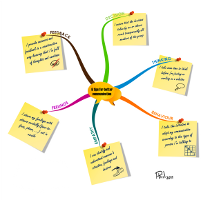
Let’s imagine you and your team have brainstormed about changes that would help members to better communicate together. You end up with a lot of items on the flip chart and finally decide to vote and only keep the 6 most important ones. In order to create a contract, you have been assigned to re-formulate each item properly, present them to the team and print it out to have it signed by everybody. A traditional approach would be to list on a sheet of paper or a bit more innovative, to create a mindmap with 6 box branches, like here below.
![]() |
| 6 tips for better communication - standard approach |
I must admit that the second one is already more engaging than the first one. But is it really enough? We all like appealing things. If we want to remember something, it should talk to us. If we want to hang it on the wall and see it every morning, we want it to be cool. If we want to commit to it, we need to be proud of what we sign. So, the final output must be different and could be something like the one below.
![]() |
| 6 tips for better communication - Engaging presentation |
I hope you find this version much more attractive and you would sign a high resolution color printing of this map. It has been created with iMindMap 5, by exploiting the power of image attachments. In presentation mode, here is what you get:
I promised to give you the resources and the explanation that would allow you to include post-it in your mind maps. First, I would like to guarantee that all the images that I’m sharing with you here have been created by myself and I give you the authorisation to copy them for your own usage without any risk of copywriting pursuit. Here are the post-it high resolution images..
![]() |
| Post-it / Yellow |
![]() |
| Post-it / Pink |
![]() |
| Post-it / Green |
Here are the steps to get a post-it on your branch.
- Open another application on your computer that would allow to write text on a picture. The easiest is to use Microsoft Powerpoint if you have MsOffice installed or a design tool of your choice;
- Import (or copy and paste) the post-it picture I created for you;
- Add a text box on top of it and write your text using the “Freestyle Script” font. I selected that one because it is representative of a hand writing which make more sense on a post-it. You can choose the font you like of course;
- Select both the post-it and the text box and copy the whole thing into the clipboard;
- Go to iMindMap, select your branch and paste the picture. You can resize, move and rotate the post-it picture according to your needs.
As mentioned earlier, you can also use the post-it to write and place a floating text annotation on your mind map. If you don’t want to link the post-it to a branch, paste your picture on the background (no branch selected). A new central idea will be created (iMindMap supports multi-maps) that you will be able to move and resize (rotation is not supported in this case). I recommend that you turn off Smart Layout (Format menu) if you want to place the post-it concurrently with your initial mindmap.
Labels:
Communication,
Creativity,
Emotion,
iMindmap 5,
Marketing,
Software,
Tutorial
Subscribe to:
Posts (Atom)