It's all about the thinking process and a fantastic way of visualising it with Mind Maps.
You will find here many resources that I'm collecting with my new passion. Whether it's rules, techniques, tutorials, tips, templates, stories, ... it may help you with mind mapping.
I'm a ThinkBuzan Licensed Instructor and everything I will share with you here will remain connected somehow to Tony Buzan's world. Enjoy!
If you are an actor in the mind mapping domain or just interested by the subject, here are 5 reasons why Biggerplate Unplugged - Utrecht (NL) is the place to be on October 9th, 2013.When your name sticks to mind mapping, when people insist to meet you in person and when you are as passionate by the subject as I am, you can’t miss an event such Biggerplate Unplugged - Utrecht. Therefore, I will cross the northern border of Belgium and I will visit my friends in The Netherlands on Wednesday, October 9, 2013. If you are an actor in the domain or just interested by the topic, it’s the place to be. We will meet there to listen to expert speakers, join roundtable discussions, and grasp the opportunity to turn online connections into real world collaboration.
Discover a unique and creative map, filled with emotions and stories, made of real objects that evoke the Biggerplate Unplugged conference in ParisVisitez ici la version française du billet
After a long period of inactivity on the blog that I devoted to the creation of a non-profit association, I wanted to share with you a nice experience I recently lived in Paris with the « Biggerplate Unplugged Paris », a conference where I was invited to talk about mind mapping.
As you may know from a previous post, my nearly 8 years old son Baptiste has already started to create mind maps, both on paper and in iMindMap 5. A couple of days ago, we discussed the possibility to participate to the ThinkBuzan competition and win an iPod touch. Very quickly, he decided to be part of it.
As you may know from a previous post, my nearly 8 years old son Baptiste has already started to create mind maps, both on paper and in iMindMap 5. A couple of days ago, we discussed the possibility to participate to the ThinkBuzan competition and win an iPod touch. Very quickly, he decided to be part of it.
What will be your central idea?
My son and I did not discussed so much about the topic that would be mapped. Baptiste selected a subject from school, the geometric shapes.
What will be your main branches?
The decision about the dimension that would be used for the main branches took a bit more time. Because it was still unclear at this stage of the process what would contain the mind map, Baptiste could not identify immediately its first level branches. So I proposed him to first collect all the shapes and look for some characteristics that would help him to categorise the set.
Baptiste is already familiar with new technologies. He knows roughly how to use a software. With Microsoft Powerpoint, he drew the set of geometric forms he wanted to place in his mind map. He found most of them in the list of predefined shapes and could easily colour them with the Quick Styles button.
While drawing, my son remembered that each shape has a certain number of sides and quite naturally, he decided to use this information for the main branches.
How do you start with iMindMap?
I had to explain to my son how to create a mind map with the application. We selected the central image from the default library and we added the title. Then, Baptise made a couple of exercises in order to understand how to add a branch, edit the text on the branch, move the branch, delete the branch. He also created deeper levels of branches. He could do most of the work with the keyboard in a speed mind map mode. Once trained, he proceeded with the different main branches and sub-branches for its geometric forms.
Can you make it better?
Because he saw several mind maps I realised, he asked me to improve the look of the one he created. In order to be fair with other competitors, we decided that Baptiste would learn how to do it himself. I explained shortly what was possible with the formatting menu of iMindMap, mainly how to change character size, colour and font. He made most of the words bigger and more colours everywhere. With the mouse he played with the connection points on the different branches in order to better exploit the space and create a better flow among branches. I had also to explain how to copy the images he prepared in Microsoft Powerpoint and paste them on the branches in iMindMap, what he did perfectly.
Just in case, I asked my son how he knew that the Hexagon was a shape with 6 sides. He told me that the teacher explained the meaning of the prefix “Hexa”. It was a good opportunity to brainstorm about the other prefixes and add this information as well.
He could also distinguished the square and the rectangle from other four-sided shapes because every angle is a right angle. He created a new sub-branch with this characteristics and re-positioned the two branches containing “square” and “rectangle” as children of that new branch. Here is the final map.
Can you present it to mama?
Baptiste is very proud of his mind map. He is also able to explain what he did using the presentation mode of iMindMap. He understood very quickly how to control it. I was proud myself as well when he made the presentation to my wife who was astonished by the performance of this young boy who was perfectly mastering his subject.
It’s amazing to see what Baptiste did but it also proving that it is possible. Children like to draw mind maps, like to use computers and do not really feel the fear to present. By giving them as soon as possible some good tools and techniques, they will be better prepare to face the challenges in their life.
Hello world! July has been rich in emotion again. I had the chance to participate in the ThinkBuzan Licensed Instructor program for the second time, this time in Amsterdam (The Netherlands). The group of participants was fantastic, full of energy with this amazing desire to learn and make the world revolve. Tony Buzan was there as well and I had the chance to exchange some words about my work.
Hello world! July has been rich in emotion again. I had the chance to participate in the ThinkBuzan Licensed Instructor program for the second time, this time in Amsterdam (The Netherlands). The group of participants was fantastic, full of energy with this amazing desire to learn and make the world revolve. Tony Buzan was there as well and I had the chance to exchange some words about my work.
ThinkBuzan Licensed Instructor (TLI) program - Amsterdam - July 2011
For me, this participation was very special. Indeed, I was there as a guest presenter. I was invited by Chris Griffiths (CEO) and his team to talk about how to be creative with iMindMap 5, the mind map software from ThinkBuzan.
Philippe Packu presenting at TLI program Amsterdam
Just a couple of months after becoming a licensed instructor myself, I managed to trigger some curiosity and create some interest on the net about creative mind maps elaborated on a computer based application. This invitation to the TLI program in Amsterdam was the occasion to share my experience. More specifically I wanted to give some keys to the future instructors that could unlock their creative potential with software.
We know or we are told that a good usage of images, colours, dimensions in mind maps will better support both the generative thinking process and recall mechanism. It’s also very important for presentation. But you do not draw a mind map on a screen like you do it on paper. Although computer interfaces are evolving at the speed of light (see how many tablet PCs were launched this year), there is some work to do in order to make your mind map unique and appealing with iMindMap.
I’m not an expert in creativity in the sense that I did not study the domain scientifically . But what I can share with you are some details about the mechanisms I have identified for myself.
It’s all about re-use and re-invent. In your brain database, you can dig and find millions of associations recorded from past experiences. What you saw, what you heard, what you tasted, what you touched, what you smelt, ... But then, it is not written in stone. Everything can be questioned. Being creative means essentially creating new connections between things that apparently were not supposed to be connected.
Mind map under the form of a tree in iMindMap 5
For example, iMindMap is supposed to create a map looking like a star or a flower with branches around the central idea. When I did this map under the form of a tree, I just imagined a new connection between the nice and colourful shape of a tree and iMindMap. I had to invent and provoke this new connection. How do you get there? It’s a personal decision, it’s mindset shifting. The idea might come when you are not expecting it but your brain must be ready in the seeking mode to catch the idea when it pops up, otherwise you will miss it. In my case, I had decided to change the shape of a standard map using the freehand tool but I had not yet decided what to draw. One day, I was looking hand drawn mind maps on the net for another purpose and I discovered very nice drawings using trees. Boom bada boom, connection made! I knew what my next attempt with the tool would be without even knowing if it was possible. See more about this mind map in my previous post Can I become a source of inspiration?
Having the idea is key but making it real may appears even more complex. Be creative means conviction, courage and determination. Believe in yourself and in what you are trying to achieve and have the courage to go up to the end. Try, try, try, ... Do, undo, re-do ... Break, build, cut, combine, ... until you see your idea becoming a true reality.
Unfortunately, we are also limited by our knowledge in techniques and tools that are supposed to assist us when realising the idea. iMindMap users might feel that it is very difficult to draw an image with the Sketch tool. But don’t you have access to much more powerful office applications that would do it for you in one or two clicks? Don’t stay within the box, go out-of-the-box of iMindMap. The tool has primary been designed for mind mapping, not for drawings. Creating new connections and associations with other well known software can clearly boost your creativity. Acquiring some skills in design is also an asset.
Look at this example. A user of iMindMap is disappointed by the visibility of the central idea label displayed on top of a central idea image. I agree, it is sometimes difficult to read. One of the ideas would be to implement in iMindMap all the features allowing the drawing of a rectangle around the text, to fill the box with colour and to create a transparency effect. Because it is not the primary objective of the tool to offer such an extensive formatting feature, it may take a while to get it there. But what about simply using Microsoft Powerpoint (or equivalent for Mac users)? So easy to get nice box effects with transparency. Much more than what iMindMap would ever offer. See it in action on the following figures.
Same label with text box effect added with Powerpoint
on the central idea image
Default label on central idea image
If you want to be creative or just be able to do things that do not appear to be possible, don’t stay within the box that is given to you, explore and connect with the outside, go out-of-the-box.
My blog is all about that, giving you the resources for going further in your quest. Whether it is for business or personal challenges, I can help you to go beyond your limits with iMindMap.
It’s amazing what is happening at home. Creating mind maps is becoming a kind of pleasant (and of course useful) pastime for all of us. I’ve probably been a bit boring these last weeks on the subject but now, boomerang is back. Both of my sons have started to create mind maps without me asking.
It’s amazing what is happening at home. Creating mind maps is becoming a kind of pleasant (and of course useful) pastime for all of us. I’ve probably been a bit boring these last weeks on the subject but now, boomerang is back. Both of my sons have started to create mind maps without me asking. Corentin, nearly 5 years old, created his first map last week-end about the family. Without any explanations or recommendations, he put the paper in landscape mode and started in the centre of the page. Then he drew some main branches and added what he does the best, drawings of family members. Here is his mind map:
Corentin - 4 yo - First mind map
A couple of days ago, Baptiste, 7 ½ years old, decided to make a mind map while waiting for a meal at the restaurant. He selected school as the central idea and developed the different activities he was performing there. I gave some explanations and a couple of rules to be respected. He had no difficulties in applying them. Here is the nice mind map he drew:
Baptiste - 7 yo - First mind map
But my biggest pride of the week-end is obviously the mind map my niece managed to produce. Aglaé, 15 years old, extremely dislikes school. She’s in danger and might not successfully pass through the education system without our help. She was my guest and knowing her affinity for colour pens and drawings, I decided to teach her how to do mind maps. We took an important lesson from the 2nd year program: French grammar. We had a look first at a couple of rules together. She completed some exercises, especially because she wanted to master curved branches. We started the final mind map on an A4 sheet of paper but I quickly saw that she needed more space, more freedom. We moved to an A3 format, much better. After only two hours of collaborative work, she was able to produce her first mind map. And look at the result!
Aglaé - 15 yo - First mind map
I would never have imagined that a teenager was able to elaborate a state of the art mind map just in a couple of hours. We drew several other mind maps about English tenses and I could really see the pleasure but also the interest and the focus in her eyes. We also looked at the iMindMap application on my laptop. She’s now back at home, where she has installed the free version of the tool. I hope she will continue from now on to create mind maps on paper and on the computer. I will follow-up of course and check whether mind maps could really help her to be able to accept the thousands of hours of school she still have to follow.
Today I attended an interesting training session mainly focused on communication. One of the exercises proposed by the trainer was to practice for few minutes with a partner and identify the things that mattered most to him in a given context (ie work).
During my interview, I took some notes but I really wanted to draw a mind map. However, I chose not to raise the issue with my partner in order to avoid disrupting his concentration. Once the exercise was finished, I used the break to take a few colored markers available to us and I made a quick mind map outlining the interests of my colleague. On his return, I was happy to explain my approach and offered him the map. He exclaimed "Wow! Did you mindmapped me?”. He was surprised by the gesture but not by the content. He was aware of the Buzan method and the subject seemed to interest him much. He made me the pleasure of photographing the mind map that I gladly share with you.
Quick mind map for a colleague
The mind map is actually not very elaborated but it is not the primary object of this post. This is to demonstrate that a mind map is also a tool for socialization and fun because it brings pleasure easily to the one who performs but also to those who receive.
It's not easy to start a blog when you have nothing to say. It becomes much more exciting to post when your passion becomes so important that you want to share your story, knowledge and experience with the rest of the world.
I've been working with mind mapping for 15 years now but it was only in February 2011 that I discovered what Tony Buzan had invented and what ThinkBuzan is all about. How is it possible? It's a known pattern of the thinking processes which prevent you from seeing new things on the road because you are so much formatted by the routine and by the fixed way of seeing the surrounding environment. But apparently Tony Buzan has already been there for a while with a fantastic philosophy: "Generate mind flowers and flood the world with them".
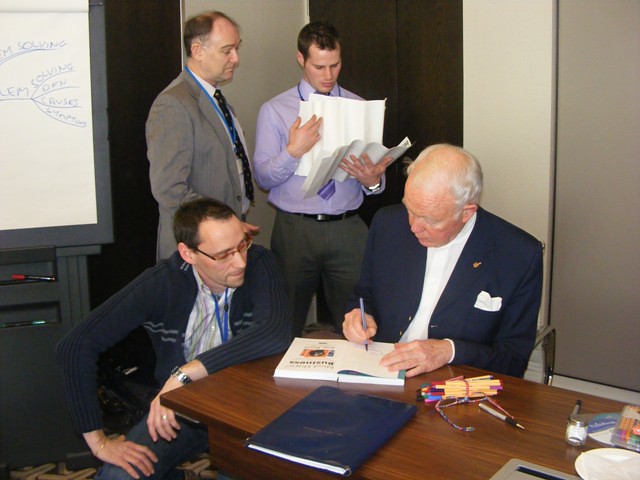
Then, everything became clear in my head. Tony Buzan, Chris Griffiths and other colleagues from ThinkBuzan have unlocked my hidden potential for making mind maps. It was during this amazing course in London officialising me as a ThinkBuzan Licensed Instructor (TLI).
Philippe Packu with Tony Buzan
It's a new start for me, I see many opportunities to spread the message further and extend the work Tony has started 40 years ago. I'm now part of a wider 'family' with similar ambitions and I'm full of thoughts and emotions just with the idea of creating mind maps as part of the ThinkBuzan network.
Beyond the thinking process and drawings on paper with a couple of colour pen, mind mapping is appearing more and more on computers. You can find a lot of software, even for free, but there is only one great tool for making Buzan compliant mind maps, it is iMindMap. You will not find a better tool on the market for approaching what we used to do on paper. Curved branches with words along, infinite space, smart layout, full of colours and images, it's the best software I've ever used.
It's a coincidence but my blog starts with the launch of iMindMap 5, the new and revolutionary version of the tool. It comes with an online access, so you can review and update your mind maps wherever you are and collaborate with colleagues or friends in real time.
 Version française
 If you are an actor in the mind mapping domain or just interested by the subject, here are 5 reasons why Biggerplate Unplugged - Utrecht (NL) is the place to be on October 9th, 2013.When your name sticks to mind mapping, when people insist to meet you in person and when you are as passionate by the subject as I am, you can’t miss an event such Biggerplate Unplugged - Utrecht. Therefore, I will cross the northern border of Belgium and I will visit my friends in The Netherlands on Wednesday, October 9, 2013. If you are an actor in the domain or just interested by the topic, it’s the place to be. We will meet there to listen to expert speakers, join roundtable discussions, and grasp the opportunity to turn online connections into real world collaboration.